Inside Laptop

Daily Blog Reveal Laptop secret!


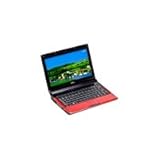
Wow, how thin this Dell netbook; only 0.9 inches. So similar to Apple MacBook Air. Lightly and tasty to carry. When held its not slippage because the back of the netbook is a bit rough. Cover is glossy white was not so diligent collecting fingerprint impressions :D.

Black accents in the back of the unit are prominent, near the hinge, located adjacent to Battery. Yes, Battery mini 12 is black, in contrast with the white casing. In the black color, present a tiny LED that will light up white when the netbook switched on or the battery charged.

There are many other things that are not normal here. First, the wide screen, 12.1 ", with high resolution, 1280x800 pixels. Consequently comfortable when surfing the virtual world. Two Web pages side by side can be opened and read with comfort. Letters also appear normal, not small. Views on the screen look very bright, and the horizontal perspective is good enough, comfortable enough views from the side. However, there are quite good ideas to push back the screen so that the reflection effect is not felt, too.

Second, the keyboard is relieved (92% normal keyboard). Distance between the buttons is wide, comfortable and so can we like to type on it. The buttons are soft enough. On the top, other than the F1 - F10, appearing in six key functions independently - F11, F12, Home, Del, Insert, End. Fn key is placed in its own down the left side.

The touch panel is Width also with a little stringy but responsive. But perhaps because the wide palmrest, touchpad occasionally jog with our wrists, so that the cursor sudden move.

From the completeness and features, mini 12 similar to the other netbook. Have the function Wi-Fi wireless 802.11 g, 1.3 megapixel Webcam, card reader 3-in-1, a headphone jack, microphone jack, three USB ports, one LAN port, VGA-out port, and security hole (Kensington lock) .. The net back and front of this netbook, aka does not show anything.

During on work, the back of the bottom of the screen unit with the adjacent Battery felt quite hot. But the touchpad and keyboard is not too affected, aka still comfortable. The bottom of the netbook was only slightly warm. The wide netbook surface plus combination of low power processors successfully affect the spread of this heat.

Mini 12 that we received came with a 80GB hard drive ATA with the two partition. The first (C:) the size of approximately 64.7 GB contains the operating system, while the D: for Recovery (9.76 GB).

O yes, to be more friendly when used, Dell include the Dock on its desktop. This panel exhibit catenarian big size icon similar with shortcut in the left side of the screen edge. However, this location can be moved with a drag and drop from the desktop or Start Menu.

***

Dell Inspiron Mini 12 difference with another netbook. More thin, but with the wide screen and keyboard convenient to use and take it carried. The Adapter similar to lightweight phone (178 grams), although two-legged. If SIMcard slot is working, we smoothly connect to the Internet anywhere and anytime. In short, this netbook really suitable for those who like practicality, beauty, and multi purpose.

Even better if Dell does not force the Vista (even though we can only do downgrade to XP). For the Z530 processor that uses less support Vista, and its RAM can not be upgraded. 3-cell battery is a need within 1 hour 52 minutes to fully presumably also need to be improved with the 6-cell.

Plus: wide screen and keyboard; physical thin; SIMcard slot; light; Recovery CD; adapter similar to phone.

Minus: mono Speaker; high price; SIMcard slot on the back of the Battery; minimal LED indicators; RAM can not be upgraded


link


Helsinki - Number one global mobile phone vendor Nokia consider to enter a field of laptop business. Nokia Chief Executive, Olli-Pekka Kallasvuo said that in an interview with the media in Finland.

"We are actively see this opportunity," said Kallasvuo as quoted Reuters.

Rumor has grown about the possibility Nokia enters the computer industry since last year. But this time the new Nokia officially acknowledge the existence of the plan.

Kallasvuo added further their already see a trend among mobile phone and PC has convergence in several ways. For instance, millions of people now access the internet for the first time via mobile phone.

On the other hand, the manufacturer of the computer itself also began to seriously launch a mobile phone. Such as Acer recently launch different types of smartphone.
Ben Wood, analyst from Insight CSS said that Nokia may be nervous to enter the business of laptop. However Nokia have clear advantages with the large scale production, supply and distribution if they finally actually enter the industry

source >> here


Eight Lenovo ThinkPad laptop designed to be semi-resistant rock. After passing through a series of tests, including baked, laptop are deemed worthy to military devices.

The eight ThinkPad is X200, X301, X200s, X200 Tablet, T400, T500, R400 and SL300. The test covers toaster, beating, drying and reaction against the sandy wind gust.

As quoted from the written information received by Thursday (5/3/2009), the endurance series ThinkPad include:

  • Low Pressure - Test the use of the height of 15,000 feet
  • Humidity - Used in cycling in the environment with 95% humidity
  • Vibration (non-operational and operational) - drop and shock-resistant laptop
  • High Temperature - simulate the condition of high heat on the laptop with the baking temperature 140 ° C
  • Low temperatures - The use of the minus 4 ° C
  • Changes in temperature suddenly - changing the temperature of minus 4 ° to 140 ° C
  • Dust - breathe in the dust some time
Geophysics expert, explorer and expedition leader Pasquale Scaturro also claim to use the ThinkPad while browsing various sites extreme. Pasquale said ThinkPad in the use of troops to the northern polar region to the volcano.

Some features of resilience are expose by Lenovo:

  • Active Protection System - parking the hard drive while the laptop detects the movement when fall or sudden movement with a system like the air bag
  • Roll Cage - Works as a protective frame around the internal components where data is stored and processing occurs, with additional roll Cage on the cover on the ThinkPad X301
  • Shock mounted Had Drive - Offering extra protection around the hard drive to protect data
  • Spill Resistant Keyboard - holding up to two oz of liquid spill on the laptop with flow away to drain off liquids under the laptop

Lenovo also offers additional features that can be selected by its users. These include low-glare screen high-brightness 680-nit for the T400, media storage solid state drives and a variety of wireless connection options, including WiMAX on the X200.

Lenovo determine the price the device starts from U.S. $ 2599

source >> here


A lot of debate about these two company. But actually these two company is the best processor in the world and compete each other to develop the type of best processor. Currently, Intel processors for notebook, have better technology to save battery. But most users will not encounter difficulty with any processor brand. Because there was no difference in performance between both. Notebooks with AMD processors are usually much cheaper price.

Latest Intel Mobile Processor technology,

  • Pentium M (Dothan) - Used in noteboook produced around 2004. This technology is made specifically for use in notebook and power needs to operate with a smaller and more cool than the preceding.
  • Celeron M (Dothan and Yonah) - single-core processor (one core) is cheap, according to the most basic applications, such as office and graphics. But not able to support applications that are heavy.
  • Core Solo (Yonah) - Processor inexpensive structure made from the Core Duo, but it only has 1 CPU core active. Core Solo replaces the Pentium M in 2006.
  • Core Duo (Yonah) - dual-core technology (two core) first from Intel. Core Duo (32-bit) to create 2 on 1 CPU without increasing the processor power consumption.
  • Core 2 Duo (Merom) - 64-bit version of the Core Duo, perform a little better than a Core Duo and can run Windows Vista and 64-bit applications other.

Mobile Technology AMD's latest processors
  • Sempron - Processor 1 core low price in the old notebook. As a replacement of the Athlon. The latest version supports 64-bit applications.
  • Turion 64 - Processor 1 core, 64-bit with the power consumption is lower than the Sempron
  • Turion 64 x2 - Dual Core version, from 64-bit Turion

GPU
Nvidia vs. ATI?
This is a debate topic that is also popular. They both produce a good graphics card. Nvidia better in OpenGL technology and support Linux. Meanwhile, ATI has better ability in the game, anti-aliasing and anisotropic filtering. There are no differences between them.

Most important you know how big the program needs to use your graphics card. If you use a 3D application or game that weight, you will need a VGA with a dedicated high performance. If not, VGA Intel GMA 900/950 is already integrated more than enough

RAM
Of all the components in the notebook, the amount of RAM installed will have the most marked effect. The large RAM, faster applications will run. Currently, the minimum is 512MB, and highly recommended you have a 1GB, especially if you're running Windows Vista. If you run multiple applications simultaneously (multitasking), you need to consider to upgrade to 2GB.
There is no different between 533MHz and 667MHz.
RAM is also one of the most prominent component in the upgrade, you can even do it yourself.

Hard Drive
How much storage capacity you need? Do you plan to store lots of files, music, video or photos? If so, you need the capacity Harddisk greater. But if you have limited funds, buy external hard drive will be cheaper and can be an option.

Optical Drive
Currently, almost all laptops are equipped with a DVD writer, which can also function as a CD writer, DVD reader and CD reader.

Wireless
When all this laptop is also equipped with wireless technology. Most of the notebook is equipped with Intel PROSET 3945 802.11 a / b / g Wireless card.

Battery
If you plan to frequently use your laptop without the charger cable to the drive power, you need enough battery capacity. Currently, the average notebook battery is able to survive about 2-3 hours.

How do I choose the warranty?
Some notebook vendors have been offering extended the warranty period with a relatively affordable price. If you want to use the notebook for long-term, there is no one considering buying a warranty extension with prices ranging between 5-10% price notebook

picture source >> here


©Design by Jinsona .Converted to Blogger by Blogger Templates.Distributed by Techodia. . . . . . ...